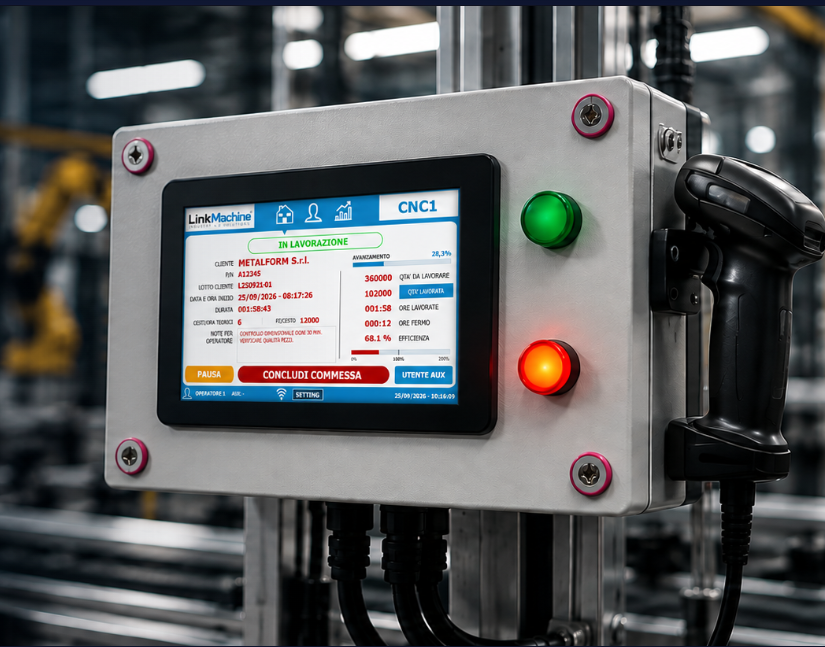
LinkMachine in a nutshell
A connected industrial panel and gateway software capture machine signals, add production context and send traceable data to your ERP.
A bridge between production and ERP
LinkMachine was created to bring real production data into the ERP system, without replacing existing machines or disrupting the way operators work.
- Non-invasive installation even on legacy machines
- Connection via digital inputs to a stroke counter or cycle relay
- Simple operator panel, designed for the workshop
- Structured data exchange with the ERP (orders, lots, quantities, times)
Main components
- Proprietary hardware panel with operator interface
- Barcode / RFID readers to identify raw materials, batches and operators
- Gateway software towards the ERP system
- Production functions: start/stop, quantities, scrap and cycle times
- Automatic inventory update directly on the ERP
From the machine to the ERP system, step step by step
The system captures machine signals, links them to production orders, materials and operators, then sends structured data to the ERP. No copying and pasting or manual transcription.
Introduction to LinkMachine
A short introduction to the panel, machines, ERP and production data. This video is available in English.
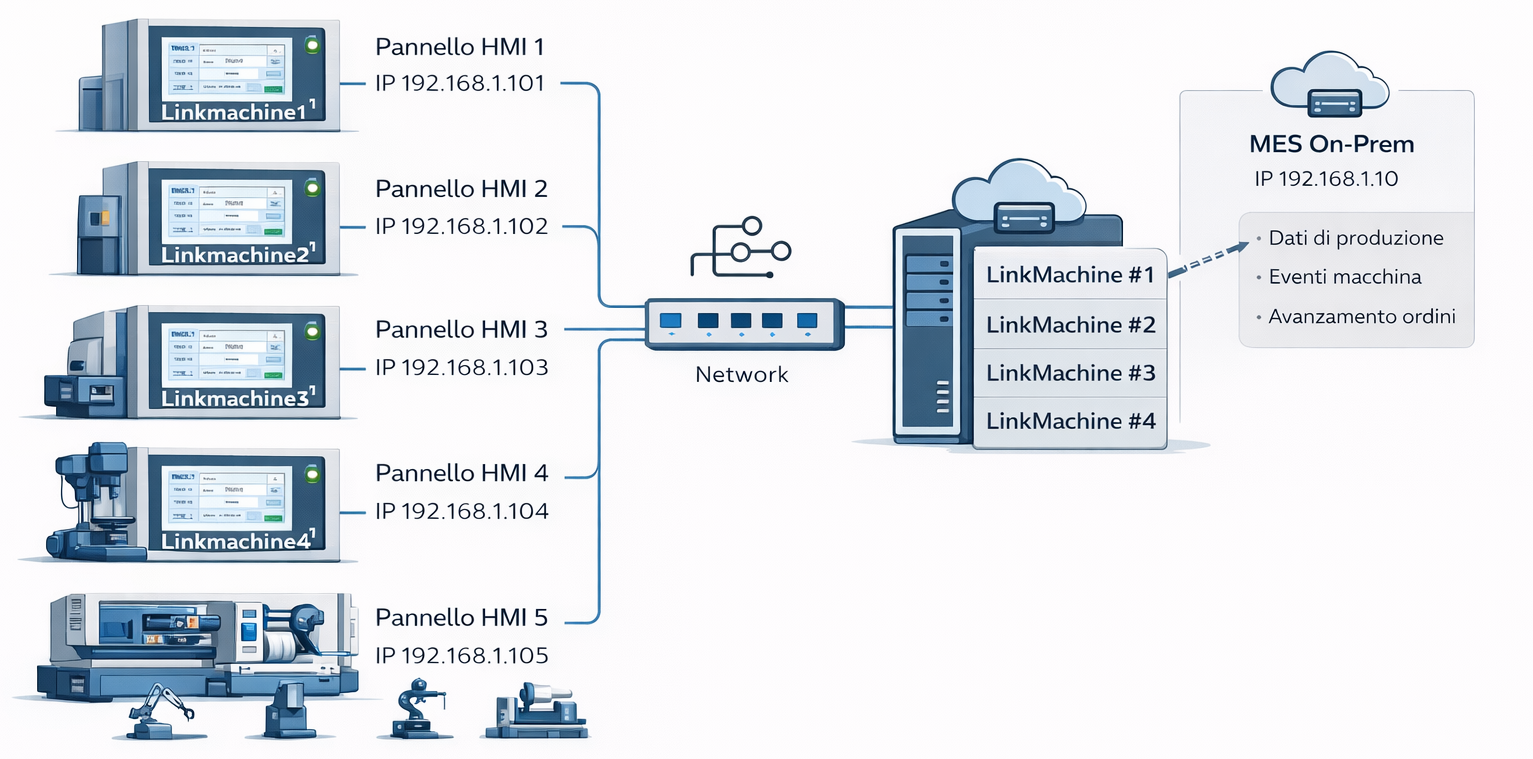
System architecture
HMI panels collect data from machines. LinkMachine centralizes it in one infrastructure and makes it available to the on-prem MES.
Compatible ERP systems
LinkMachine integrates with the main ERP systems present in the company, via dedicated connectors or customized interfaces.
- Zucchetti
- TeamSystem
- Ready Pro
- SAP
- Microsoft Dynamics
- Odoo
- Other ERP systems on request (API, exchange file, database)
Communication protocols
LinkMachine connects to new or legacy machines and PLCs via standard industry protocols or with simple digital inputs, to ensure universal compatibility.
- OPC UA – open standard for industrial communications
- Siemens S7 – integration via Ethernet or Profinet
- Modbus TCP / RTU – quick and universal connection
- Fanuc FOCAS / Ethernet – direct reading from Fanuc numerical controls
- Electrical contact (PLC output or cycle relay) – for legacy machines without digital interfaces
Connection to existing machines
Connection via digital inputs to stroke counter or cycle relay. The machine continues working as always, LinkMachine counts the cycles and records the quantities produced.
Identification with barcode or RFID
The operator reads the order code, the lot or the raw material with a barcode reader or a dedicated RFID reader. The panel always knows what is being produced and with what material.
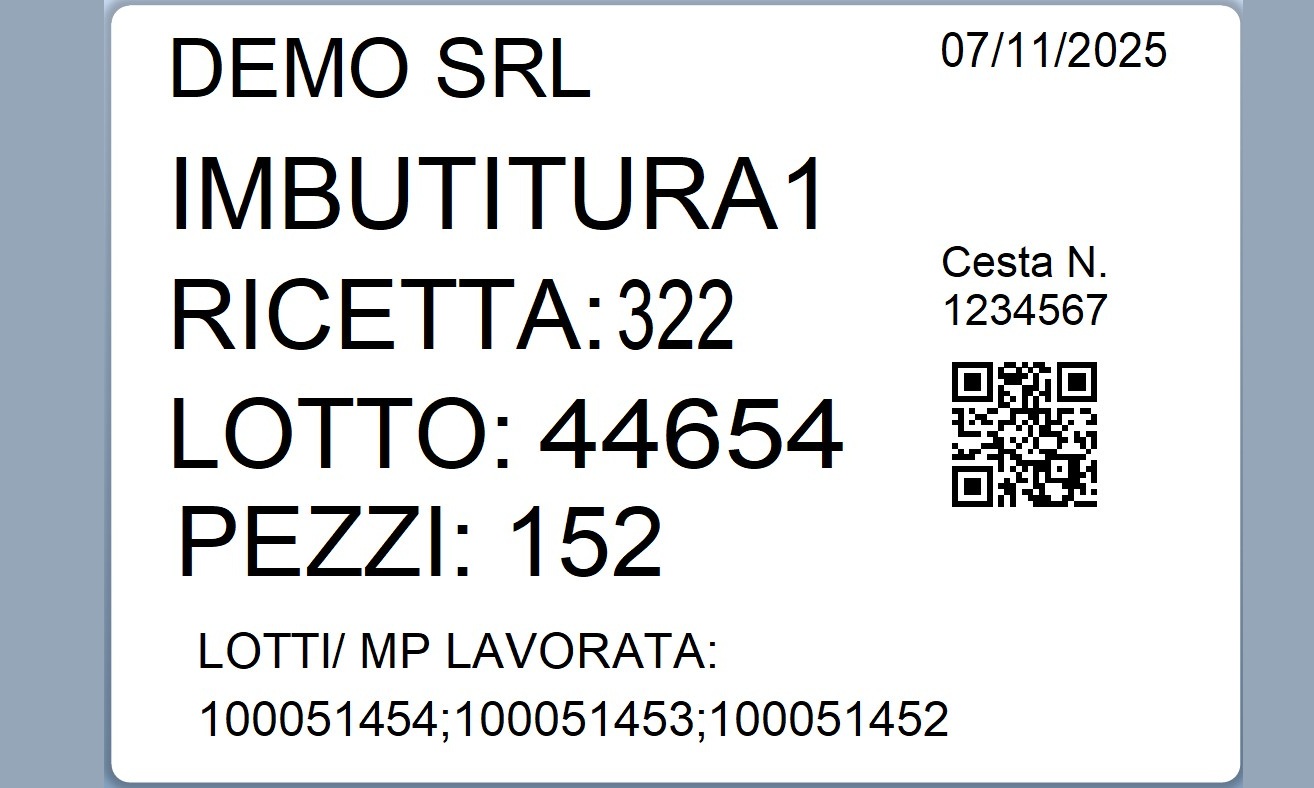
Print labels and traceability
The panel can generate and print labels with barcodes or QR codes, batches, quantities and other useful information for logistics, inventory and quality.
Data exchange with the ERP system
The gateway software communicates with the ERP system: updates produced quantities, order progress, consumption of raw materials and inventory stocks, based on the agreed configuration.
What you can do with LinkMachine
From simple piece counting to advanced management of orders, batches and traceability, LinkMachine grows with customer needs.
Production data collection
Counting pieces, cycles, working times and downtime. The data is associated with production orders.
Print labels
Print labels for semi-finished goods, finished products, pallets and batches, with codes that inventory and quality teams can scan.
Inventory update
Automatically update quantities in the ERP for both raw materials and finished goods.
Production planning
When connected to planning software, LinkMachine can use orders to schedule production and send work lists to machine panels.
Bring efficiency, control and traceability to your production
LinkMachine brings Industry 4.0 logic to the factory in a concrete way, without endless projects or complicated platforms.
Less paper, fewer errors
Replace paper data sheets and manual ERP entry. Production data is captured digitally at the machine.
Easy for operators
A simple interface with clear buttons and barcode or RFID scanning. No specialist IT skills required.
Reliable data for decision makers
Managers have consistent and up-to-date data at their disposal, useful for making decisions on machine loads, times, bottlenecks.
Modular and scalable
Start from one or a few machines and you can extend the system to the rest of the plant, reusing the same logic.
Some companies that have already chosen LinkMachine
LinkMachine is already operational in real production contexts, on new and legacy machines, integrated with different ERP systems.
 Globalsider Srl – Ribbon Service Center
 Raccorderia Verolese Srl
 Adveco Srl
 TorriFonderie Srl
One project, many panels
The first installation covers the main software work: adapting data exchange and connecting a pilot machine to your ERP. Expanding to other machines usually requires additional panels and configuration.
Start with one machine, expand across your plant
LinkMachine lets you build a reusable architecture. The first installation covers analysis, ERP integration and data flows; later installations build on that foundation.
- Pilot machine with complete software project
- ERP integration tailored to your operation
- Data exchange logic reusable on other lines
Scalability at low cost
When you extend LinkMachine to other machines, the main costs are usually hardware and setup. You can expand machine monitoring across the plant in stages.
- For new machines you mostly pay the hardware panel
- The software foundation is already in place and needs only targeted adjustments
- You can proceed by step, based on your budget and priorities
The panel and software in action
Some images of the LinkMachine panel, machine connections and software screens.

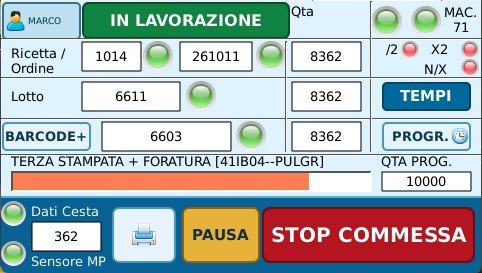

LinkMachine panel configurations
Some examples of LinkMachine panel configuration, complete with enclosures and readers. Prices are indicative and can be adjusted according to the needs of the project.
4.3" PANEL – Starting from
€ 670,00
Options:
- 300×200×120 or 200×150×120 enclosures
- Industrial 4.3" touch panel
- Industrial IP box (two sizes available)
- 2 LEDs (red / green) for machine status
- Digital inputs for electrical contact / PLC output
7" PANEL – Starting from
€ 850,00
Options:
- 300×200×120 or 200×150×120 enclosures
- Complete 7" kit with enclosure and 2 LEDs
- Industrial wireless barcode reader
- Code reading integration for orders, batches, materials
4.3" PANEL – Barcode + RFID kit
€ 1.250,00
Enclosures: 300×200×120 mm or 200×150×120 mm
- Complete 4.3" kit with enclosure and 2 LEDs
- Wireless barcode reader
- RFID reader for operator/material badges
- Advanced traceability configuration
LinkMachine Software Configurations
LinkMachine software modules, combinable and scalable according to project needs.
LinkMachine – Core
€ 1.500,00
Starting from
- Production data collection
- Flow management (recipe, batch, orders)
- Operator interaction
- Data traceability
Extensions
€ 500,00
Starting from / module
- PLC / CNC integration
- Industrial protocol connections
- Reading states and variables
- Adaptation to heterogeneous machines
Additional modules
€ 500,00
Starting from / module
- MES light
- Advanced traceability
- Dashboard and reporting
- ERP integration
Further information: on-board data collection, ERP machine connection, alternatives to MES systems, integration of existing machines, Industry 4.0 regulations, Industry 4.0 investments, case studies.
Do you want to connect your machines too?
Tell us how your production is made (types of machines, used ERP system, what you would like to track) and we will propose a LinkMachine architecture suited to your reality.
Fill out the form or write directly to:
info@linkmachine.it
We can organise:
- an introductory video call
- a visit to the company to see the machines
- a dedicated demo of the panel and gateway